> ## Documentation Index
> Fetch the complete documentation index at: https://www.edgee.ai/docs/llms.txt
> Use this file to discover all available pages before exploring further.
# Distribute plugins to your team
> Create shared skills and tools, assign them to members, and verify delivery through the CLI.
Plugins package instructions and tools for the coding agents in your organization. Administrators create and distribute them; members can inspect the plugins assigned to them.
The content types offered by the editor and their support in each agent can differ. Use the agent-specific preview and your installed CLI's help to check the available behavior.
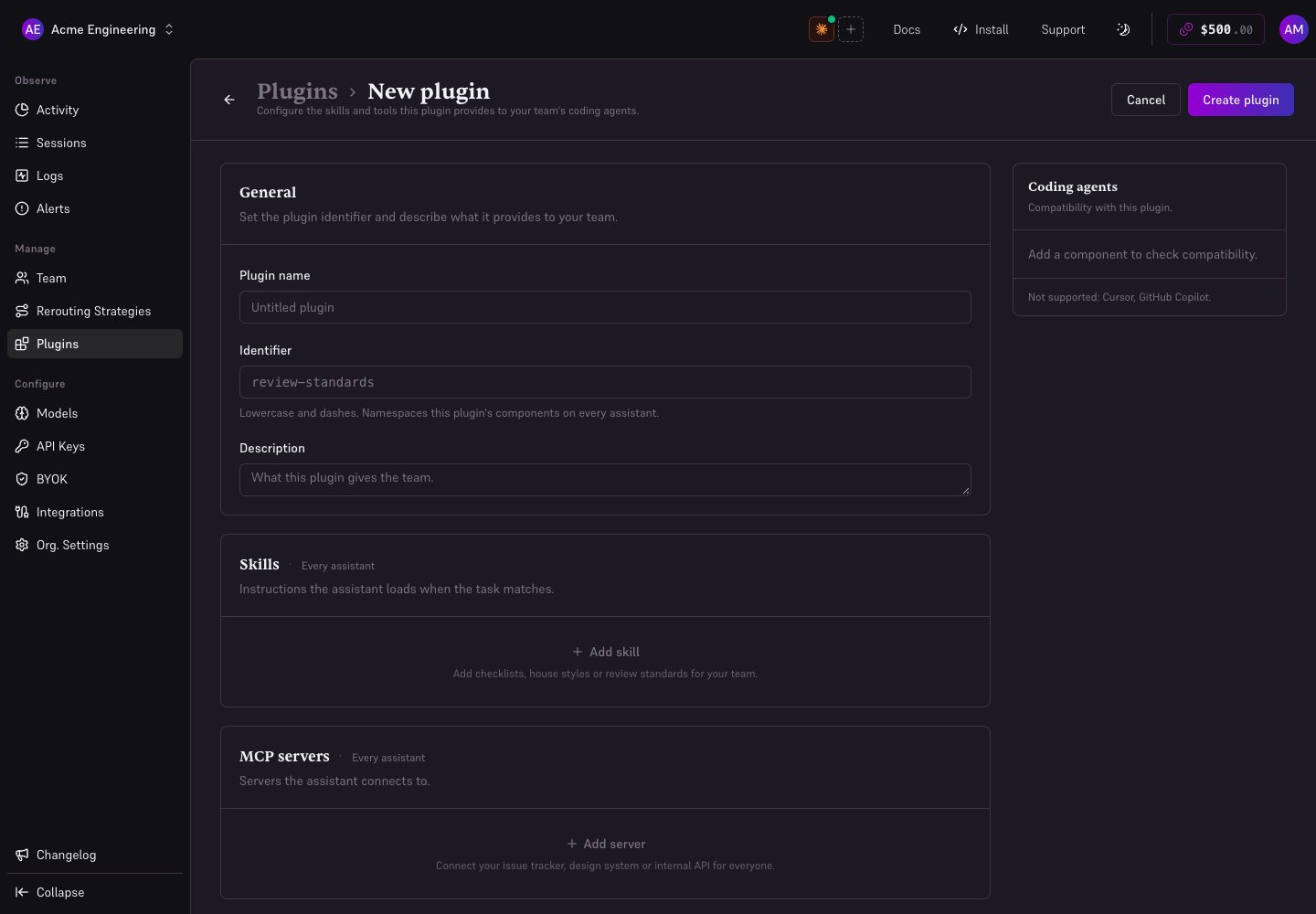 ## Create a plugin
1. Open **Plugins → Create plugin** as an administrator.
2. Give it a display name, a lowercase identifier using dashes, and a description explaining when your team should use it.
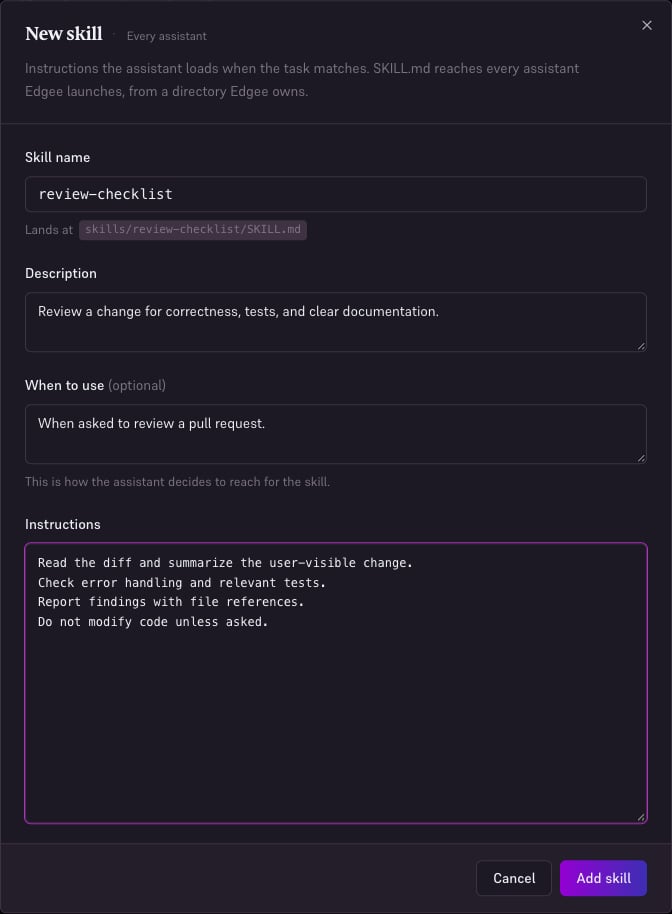
3. Choose **Add skill**. Enter a name, description, optional **When to use**, and the Markdown instructions.
4. Add other supported content, such as MCP servers, only when needed. If Hooks or Subagents are available, review their behavior for the target agent before distributing them.
5. Inspect the agent-specific file preview and choose **Create plugin** or **Save changes**.
Saving content and choosing recipients are separate actions. Start with a small group before distributing an organization-wide plugin.
## Create a plugin
1. Open **Plugins → Create plugin** as an administrator.
2. Give it a display name, a lowercase identifier using dashes, and a description explaining when your team should use it.
3. Choose **Add skill**. Enter a name, description, optional **When to use**, and the Markdown instructions.
4. Add other supported content, such as MCP servers, only when needed. If Hooks or Subagents are available, review their behavior for the target agent before distributing them.
5. Inspect the agent-specific file preview and choose **Create plugin** or **Save changes**.
Saving content and choosing recipients are separate actions. Start with a small group before distributing an organization-wide plugin.
 ## Assign recipients
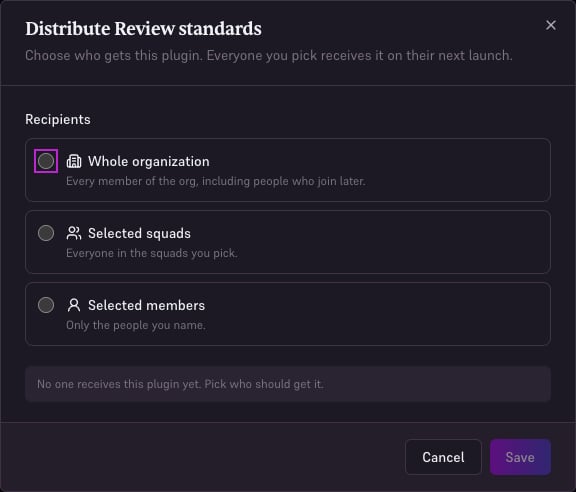
Open the plugin's distribution action, choose the whole organization, selected squads, or selected members, and **Save**. Review the recipient count before saving. Squad membership affects who is targeted.
## Assign recipients
Open the plugin's distribution action, choose the whole organization, selected squads, or selected members, and **Save**. Review the recipient count before saving. Squad membership affects who is targeted.
 ## Verify on a developer machine
```bash theme={"dark"}
edgee auth orgs
edgee plugins
edgee launch claude
```
Check that the CLI is using the intended organization and lists the assigned plugin. Launch a new supported agent session so Edgee can synchronize its assigned content. Confirm the skill or tool is available in the agent; the console preview helps identify the expected files and agent support.
`edgee plugins list` is the explicit listing command. Use `edgee plugins list --verbose` to see individual components and why content is not delivered. The CLI list does not let a member opt out of an administrator's assignment.
## Update or stop distribution
Edit the plugin, save the change, and verify it in a fresh agent launch before widening its assignment. Use the distribution dialog's stop-distribution action when it should no longer be assigned. Check the result on a new launch; do not assume a running agent reloads content immediately.
## Troubleshooting
* **Plugin missing from the list:** check profile, organization, and membership in the assigned squad.
* **Plugin listed but a tool missing:** inspect the target agent's preview and supported content types; check MCP prerequisites and credentials.
* **Old content:** save the plugin, start a new launch, and inspect the CLI's synchronization result.
Do not embed shared production secrets in skill text. Use the supported credential mechanism for the MCP server or tool.
## Agent and MCP support
The current editor marks **Cursor and GitHub Copilot as unsupported** for plugin delivery. Check compatibility before choosing recipients. MCP servers use HTTP endpoints; select the supported authentication mode (none, headers, or OAuth). A local stdio server is not interchangeable with an HTTP endpoint.
## Verify on a developer machine
```bash theme={"dark"}
edgee auth orgs
edgee plugins
edgee launch claude
```
Check that the CLI is using the intended organization and lists the assigned plugin. Launch a new supported agent session so Edgee can synchronize its assigned content. Confirm the skill or tool is available in the agent; the console preview helps identify the expected files and agent support.
`edgee plugins list` is the explicit listing command. Use `edgee plugins list --verbose` to see individual components and why content is not delivered. The CLI list does not let a member opt out of an administrator's assignment.
## Update or stop distribution
Edit the plugin, save the change, and verify it in a fresh agent launch before widening its assignment. Use the distribution dialog's stop-distribution action when it should no longer be assigned. Check the result on a new launch; do not assume a running agent reloads content immediately.
## Troubleshooting
* **Plugin missing from the list:** check profile, organization, and membership in the assigned squad.
* **Plugin listed but a tool missing:** inspect the target agent's preview and supported content types; check MCP prerequisites and credentials.
* **Old content:** save the plugin, start a new launch, and inspect the CLI's synchronization result.
Do not embed shared production secrets in skill text. Use the supported credential mechanism for the MCP server or tool.
## Agent and MCP support
The current editor marks **Cursor and GitHub Copilot as unsupported** for plugin delivery. Check compatibility before choosing recipients. MCP servers use HTTP endpoints; select the supported authentication mode (none, headers, or OAuth). A local stdio server is not interchangeable with an HTTP endpoint.