> ## Documentation Index
> Fetch the complete documentation index at: https://www.edgee.ai/docs/llms.txt
> Use this file to discover all available pages before exploring further.
# Sessions
> Every coding session, captured. Inspect tokens, costs, and compression — and share the report with one link.
A **session** is one run of your coding agent through Edgee. Sessions are the per-run unit of Edgee's **Observability** feature: every request, every compression event, every cost delta, all attached to a single ID.
Every time you `edgee launch claude`, `edgee launch codex`, or `edgee launch opencode`, the CLI assigns a unique session ID and captures every request that flows through the gateway during that run. When the session ends, you get a link to a detailed report.
 ## What's tracked
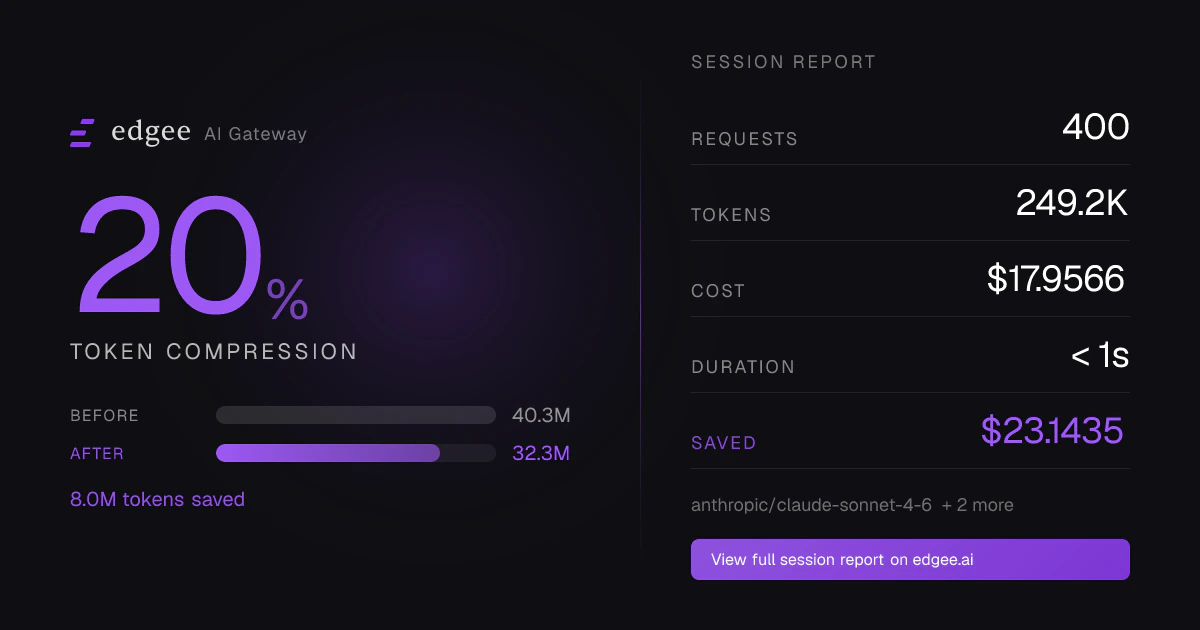
Each session records:
* **Tokens** — input, output, total, with per-model breakdown
* **Cost** — dollar cost computed from real-time provider pricing
* **Compression** — tokens saved, % reduction, and savings broken down by tool
* **Requests** — count, errors, average response time, request cadence over time
* **Duration** — first to last request
* **Models used** — distribution across Claude, GPT, etc.
## Two views: private and public
Every session has two URLs.
### Private view (org)
`/~//sessions/` — visible only to authenticated members of your organization.
This is the full view: editable session name, GitHub repo / PRs / commits, request-level logs, error breakdown,
CLI version, request cadence sparkline.
### Public view
`/sessions/` — anyone with the URL can view.
The public page shows:
* Your name and avatar (from the API key's owner)
* Total requests, tokens, cost, duration
* Models used and compression savings
* Per-tool compression breakdown
It does **not** show: session name, GitHub metadata, PR / commit links, individual request payloads, or error details.
Sharing a session URL exposes your name, avatar, total cost, tokens, and model usage to anyone who opens the link.
Don't share it if any of these are sensitive. The URL is unguessable but unauthenticated — treat it like a public Gist.
## Sharing
From the session page in the console, click **Share** to:
* **Copy link** to the public URL
* **Post to X / LinkedIn** with a pre-filled card
* **Open Graph preview** — when posted to social platforms, the link unfurls into a card showing compression % or
token / cost / request stats
Public sessions are also eligible for the [leaderboard](https://www.edgee.ai/leaderboard) — top sessions by
compression savings, tokens, or cost over the last day, week, or month.
## Linking sessions to GitHub
Sessions can be tied to the actual code work they produced — the repository, the pull requests opened or edited,
and the commits made. Once linked, the session report shows clickable links to GitHub right next to the token
and cost stats.
### Prerequisite: install the Edgee GitHub App
Repository linking only works for repos your organization has connected via the **Edgee GitHub App**. Without the
App, calls to `setSessionGitHubRepo` are silently ignored (the API returns `ignored`) and no repo appears on the
session page.
To install:
1. Go to **Settings → Integrations → GitHub** in the Edgee Console
2. Click **Install GitHub App** and select the org and repos you want to link
3. Approve on GitHub
Repos selected during install become eligible. You can update the selection from GitHub's App settings later.
### What gets shown
Once a session has GitHub metadata attached, the private session page displays:
* **Repo** — `owner/repo`, linked to GitHub
* **Pull requests** — every PR URL or `#number` attached during the session, clickable
* **Commits** — every commit SHA or commit URL, clickable
This makes the session a self-contained record of "what the agent did" — code-level changes alongside
token / cost / compression metrics.
For an organization-wide rollup of repo and PR activity across every team member's sessions, see
[Team management → GitHub activity](/docs/features/team#github-activity).
### How metadata gets attached
The agent attaches GitHub metadata itself: Claude Code or Codex calls the MCP tools below during the session.
The MCP tools are documented in the next section.
## Enriching sessions with MCP tools
When you run Claude Code or Codex through Edgee, the agent has access to four MCP tools that attach metadata to
the running session.
| Tool | What it does |
| ----------------------- | ---------------------------------------------------------------------------------------------------------------------------------------------------------- |
| `setSessionName` | Set a human-readable name (defaults to "Untitled Session") |
| `setSessionGitHubRepo` | Link the session to a GitHub repo (e.g. `owner/repo`). Requires the org to have the Edgee GitHub App installed for that repo — otherwise silently ignored. |
| `addSessionPullRequest` | Attach a PR URL or `#number` to the session |
| `addSessionCommit` | Attach a commit SHA or commit URL to the session |
All four require the session ID, which the CLI exposes to the agent automatically.
### Example: agent self-tags its work
In a `CLAUDE.md` or system prompt, you can instruct the agent:
```md theme={"dark"}
At the start of the session, call setSessionName with a 3-6 word summary of the task.
After every commit, call addSessionCommit with the commit SHA.
After creating or editing a PR, call addSessionPullRequest with the PR URL.
```
The session report will then show the task name, the linked repo, every commit made during the session, and any PRs touched —
without you typing anything in the console.
`addSessionPullRequest` and `addSessionCommit` are append-only and de-duped. Calling them multiple times with the
same value is safe.
## Finding past sessions
* **CLI** — `edgee stats` lists your most recent sessions
* **Console** — `/~//sessions` shows the full list with filtering and search
* **End-of-run link** — every `edgee launch` prints the session URL when the agent exits
## Next steps
* [Edgee CLI](/docs/features/cli) — launch agents and start a session
* [Observability](/docs/features/observability) — aggregate metrics across all sessions
* [Team management](/docs/features/team) — see sessions across your whole team
## What's tracked
Each session records:
* **Tokens** — input, output, total, with per-model breakdown
* **Cost** — dollar cost computed from real-time provider pricing
* **Compression** — tokens saved, % reduction, and savings broken down by tool
* **Requests** — count, errors, average response time, request cadence over time
* **Duration** — first to last request
* **Models used** — distribution across Claude, GPT, etc.
## Two views: private and public
Every session has two URLs.
### Private view (org)
`/~//sessions/` — visible only to authenticated members of your organization.
This is the full view: editable session name, GitHub repo / PRs / commits, request-level logs, error breakdown,
CLI version, request cadence sparkline.
### Public view
`/sessions/` — anyone with the URL can view.
The public page shows:
* Your name and avatar (from the API key's owner)
* Total requests, tokens, cost, duration
* Models used and compression savings
* Per-tool compression breakdown
It does **not** show: session name, GitHub metadata, PR / commit links, individual request payloads, or error details.
Sharing a session URL exposes your name, avatar, total cost, tokens, and model usage to anyone who opens the link.
Don't share it if any of these are sensitive. The URL is unguessable but unauthenticated — treat it like a public Gist.
## Sharing
From the session page in the console, click **Share** to:
* **Copy link** to the public URL
* **Post to X / LinkedIn** with a pre-filled card
* **Open Graph preview** — when posted to social platforms, the link unfurls into a card showing compression % or
token / cost / request stats
Public sessions are also eligible for the [leaderboard](https://www.edgee.ai/leaderboard) — top sessions by
compression savings, tokens, or cost over the last day, week, or month.
## Linking sessions to GitHub
Sessions can be tied to the actual code work they produced — the repository, the pull requests opened or edited,
and the commits made. Once linked, the session report shows clickable links to GitHub right next to the token
and cost stats.
### Prerequisite: install the Edgee GitHub App
Repository linking only works for repos your organization has connected via the **Edgee GitHub App**. Without the
App, calls to `setSessionGitHubRepo` are silently ignored (the API returns `ignored`) and no repo appears on the
session page.
To install:
1. Go to **Settings → Integrations → GitHub** in the Edgee Console
2. Click **Install GitHub App** and select the org and repos you want to link
3. Approve on GitHub
Repos selected during install become eligible. You can update the selection from GitHub's App settings later.
### What gets shown
Once a session has GitHub metadata attached, the private session page displays:
* **Repo** — `owner/repo`, linked to GitHub
* **Pull requests** — every PR URL or `#number` attached during the session, clickable
* **Commits** — every commit SHA or commit URL, clickable
This makes the session a self-contained record of "what the agent did" — code-level changes alongside
token / cost / compression metrics.
For an organization-wide rollup of repo and PR activity across every team member's sessions, see
[Team management → GitHub activity](/docs/features/team#github-activity).
### How metadata gets attached
The agent attaches GitHub metadata itself: Claude Code or Codex calls the MCP tools below during the session.
The MCP tools are documented in the next section.
## Enriching sessions with MCP tools
When you run Claude Code or Codex through Edgee, the agent has access to four MCP tools that attach metadata to
the running session.
| Tool | What it does |
| ----------------------- | ---------------------------------------------------------------------------------------------------------------------------------------------------------- |
| `setSessionName` | Set a human-readable name (defaults to "Untitled Session") |
| `setSessionGitHubRepo` | Link the session to a GitHub repo (e.g. `owner/repo`). Requires the org to have the Edgee GitHub App installed for that repo — otherwise silently ignored. |
| `addSessionPullRequest` | Attach a PR URL or `#number` to the session |
| `addSessionCommit` | Attach a commit SHA or commit URL to the session |
All four require the session ID, which the CLI exposes to the agent automatically.
### Example: agent self-tags its work
In a `CLAUDE.md` or system prompt, you can instruct the agent:
```md theme={"dark"}
At the start of the session, call setSessionName with a 3-6 word summary of the task.
After every commit, call addSessionCommit with the commit SHA.
After creating or editing a PR, call addSessionPullRequest with the PR URL.
```
The session report will then show the task name, the linked repo, every commit made during the session, and any PRs touched —
without you typing anything in the console.
`addSessionPullRequest` and `addSessionCommit` are append-only and de-duped. Calling them multiple times with the
same value is safe.
## Finding past sessions
* **CLI** — `edgee stats` lists your most recent sessions
* **Console** — `/~//sessions` shows the full list with filtering and search
* **End-of-run link** — every `edgee launch` prints the session URL when the agent exits
## Next steps
* [Edgee CLI](/docs/features/cli) — launch agents and start a session
* [Observability](/docs/features/observability) — aggregate metrics across all sessions
* [Team management](/docs/features/team) — see sessions across your whole team