Edgee Mod for Claude Code

Your models and savings.
One click away.

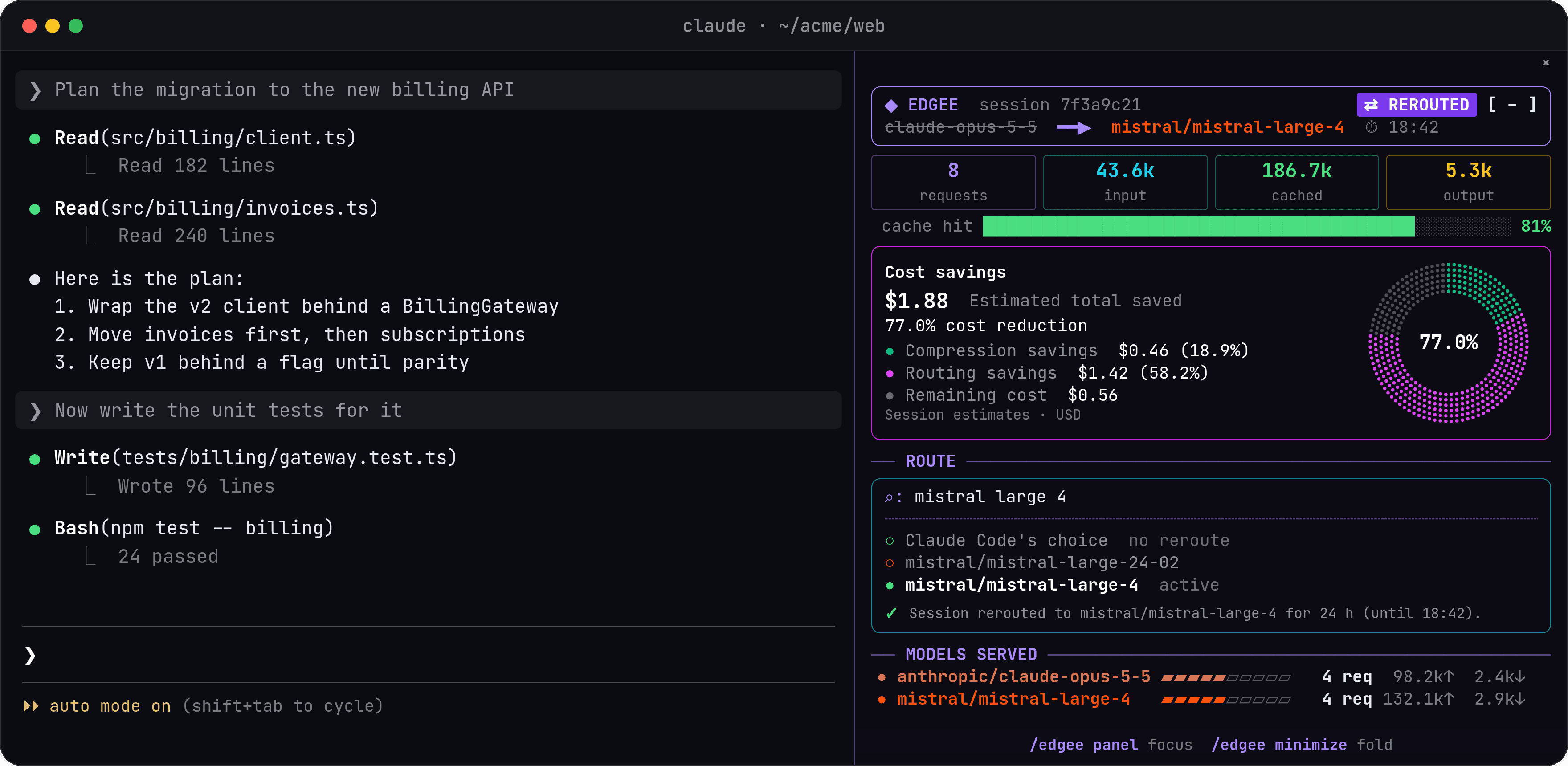
Your model, savings, and session activity, right beside your conversation. Edgee replaces its old statusline with an interactive sidebar. Click [+] at the bottom right of Claude Code to open it.

Bundled with Edgee · Claude Code 2.1.287+ · Edgee MCP enabled

Claude Code terminal with the conversation on the left and the Edgee Mod sidebar showing model selection, tokens, and estimated savings on the right.

One click opens the full picture

Start with a compact bar above your prompt. Click [+]to open the sidebar and interact with your session. Click [−]to fold it away and keep coding.

Choose your model

A model picker beside your conversation

Search by model or provider in the sidebar, then select a model to reroute your session. Bring in an available open-weight model mid-task, or choose “Claude Code’s choice” to return to normal routing.

See your savings

A visual breakdown of what you save

See estimated routing and compression savings in a single chart. Follow how model selection, input compression, and output brevity contribute to savings as the session progresses.

Follow your session

The details behind each response

See which models actually answered, input and output tokens, cache usage, and the latest observed requests. Request durations and subagent activity sit alongside your conversation.

Cost savings, live

See what you save.

  • Compression trims input tokens and keeps output concise.
  • Routing saves when you switch to a lower-cost model.
  • Per session, estimated in USD, right in your terminal.

Cost savings

$1.88

Estimated total saved

Compression savings
$0.46 (18.9%)
Routing savings
$1.42 (58.2%)
Remaining cost
$0.56

Illustrative session · Estimates in USD

◆ Edgee⇄ reroutedmistral-large-4saved $1.88 est.compression $0.468 req · 230.3k↑ 5.3k↓ · 81% cache
[ + ]

Folded, the Edgee Mod is one line above your prompt. Click [+] in Claude Code to open the sidebar.

Example session figures. Actual savings vary; the Edgee console remains your reference for gateway spend.

Watch the sidebar in action

See how Edgee fits into your Claude Code workflow.

Watch on YouTube

Launch Claude Code with the Mod included

No separate Mod installation. Start with the latest Edgee CLI and a supported Claude Code version.

  1. 1

    Install or update Edgee

    Install the Edgee CLI, or run edgee update if you already have it. Use Claude Code 2.1.287 or newer.

  2. 2

    Launch Claude Code

    Run edgee launch claude. The Mod loads automatically with Edgee MCP enabled, starting with a compact bar above your prompt.

  3. 3

    Click [+] to explore

    Click [+] at the bottom right of Claude Code to open the sidebar. Pick a model, explore your savings, and follow your session. Click [−] to collapse it.

Already using Edgee? Run edgee update before your next launch. Keep Edgee MCP enabled so the Mod can list models and apply your selection.

Read the setup guide

Questions about Claude Mod

Session control for developers. Visibility for the team.

Use the Mod in the terminal and the Edgee console for cost and usage across developers, repositories, PRs, models, and environments.