Know what each request costs
Bring model, provider, token usage, and cost into the dashboards your engineering team already uses.
Edgee Demo Day · November 10 · Live online: compression, routing and fallback demos. No slides.
RegisterIntegrations · OpenTelemetry
Edgee routes, compresses, and meters your coding-agent requests. Send a copy of their usage logs to Grafana over OTLP, and put model costs and team usage beside the rest of your engineering metrics.
Hosted gateways · OTLP over HTTP or gRPC
Your coding agents
Claude Code · Codex · OpenCode
Edgee Agent Gateway
Route · Compress · Observe
Model · Tokens · Cost · Developer · Session
Your observability stack
Grafana Cloud or your OTLP receiver
Keep the signals you need to understand spending and tune your routing policies in the tools your team already knows.
Bring model, provider, token usage, and cost into the dashboards your engineering team already uses.
Use developer, squad, and session identifiers to group usage and investigate where spend comes from.
Inspect routing flags, compression fields, latency, and errors alongside usage records, where available.
Open Integrations in the console, choose OTLP, and enter your HTTP or gRPC endpoint and authentication headers.
Run Test Connection, then Send Log. Confirm the test record arrives in Grafana or your receiving system.
Save the destination as active. Send a new model request and check that its usage record reaches your stack.
A reachable endpoint is only the first check. Send a test log and find it in the receiving system before enabling the destination.
Forwarding runs asynchronously alongside Edgee’s own pipeline. Each active destination gets a copy; you keep your existing Edgee usage views.
Read the setup guide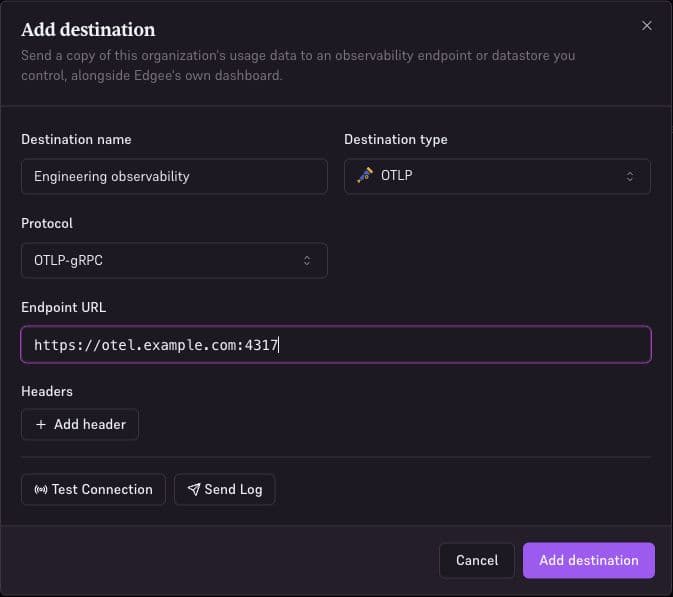
Use OTLP for your observability stack, or send records to a storage or analytics destination. Configure more than one when different teams need the same data.
Route requests under your budget rules, compress token usage, and observe the results in Edgee and your own stack.